Background
Background removal
Just the product, or just the person, on a transparent background. A PNG ready to drop into a shop listing, a slide or a piece of artwork.
Removing the background from one photo: PLN 6.99
See the full price listThe cheapest thing we do, because it is one very specific operation.
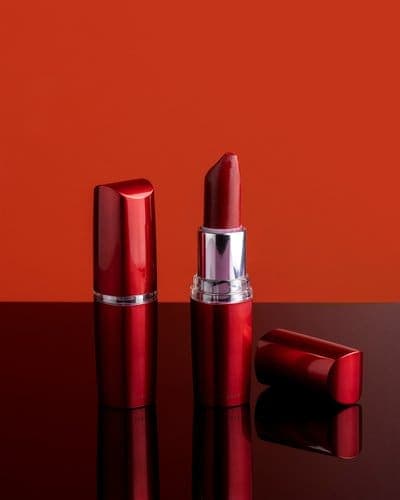
Before
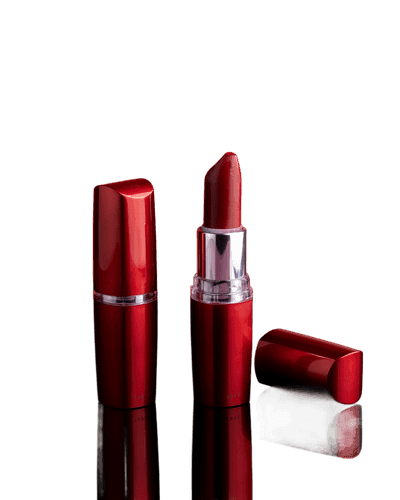
After
When this solves the problem
A product shot taken wherever the light was
Amazon and eBay want a plain background on the main image, and your stock was photographed on a kitchen table. Cutting the background out meets the requirement without booking the shoot again.
A shop where every photo comes from a different day
One picture taken by a window, another in the evening, a third on the carpet. A shared background tidies the entire product grid in an afternoon.
A banner, a leaflet, a slide
A cut-out figure or object drops straight into a layout with no white box around it, so the designer does not start the job by fighting the background.
One person out of a family photograph
Sometimes the only good picture of a grandmother has half a wedding party and a net curtain behind her. What is left is the person, and you choose what goes behind her.
How it works
- 01
Finding the subject
The thing the photograph is actually about is identified. With one clear object or one person the decision is unambiguous.
- 02
Tracing the edge
The contour is worked out to the pixel, including semi-transparent areas: hair, glass, mesh, thin fabric.
- 03
Separating the background
Everything but the subject goes, including shadows cast onto the background, which usually get in the way in a listing.
- 04
Saving with transparency
The result is a PNG with an alpha channel, so you can put any background behind it: white, coloured or none at all.
What to watch for
Hair, fur, lace and glass are the hard cases, because their edges are semi-transparent. The result is usually good, but with photographs like that it is worth checking the contour at full size before the file goes into a shop.
Sharp contrast between the subject and the background makes the job easier. A black jumper on a black armchair is harder than the same jumper against a light wall. If you have any say when the photograph is taken, pick a background of a different brightness.
A transparent PNG can be larger than a JPG. Shops usually put a white background behind it and re-save anyway, at which point the file size stops mattering.
Try it on one product photo
Ideally the one that has been causing the most trouble.